Why won't the connected device work when using the IU-100/110/120 series
Q: Why won't the connected device work when using the IU-100/110/120 series?
A: Starting from FTDI VCP driver version 2.12.36.20, the Serial Enumerator feature is disabled by default because it is considered a legacy function.
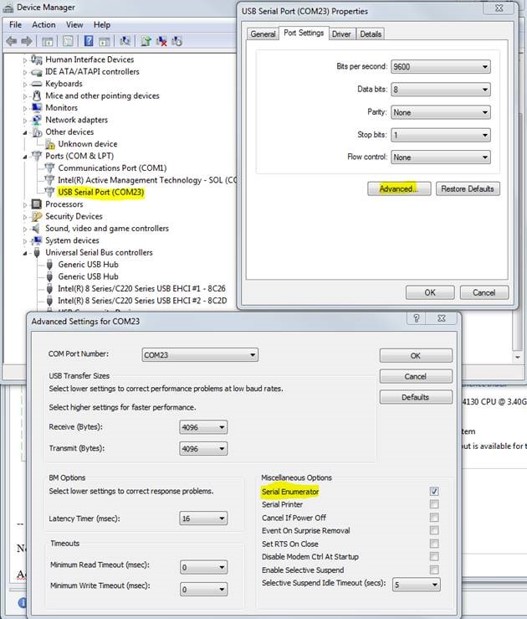
If you are using the IU-100/110/120 series, you can re-enable the Serial Enumerator feature through Windows Device Manager.
How to enable Serial Enumerator
- Open Device Manager.
- Expand Ports (COM & LPT).
- Right-click the corresponding USB Serial Port and select Properties.
- Navigate to the Port Settings tab.
- Click Advanced.
- Check the option Enable Serial Enumerator.
- Click OK and reconnect the device if necessary.
Click OK and reconnect the device if necessary.
Additional Notes:
The function of the serial enumerator is to detect a Plug-and-Play enabled device (such as a serial mouse or serial modem) that is attached to the USB serial port.
The serial enumerator functionality in the VCP driver will also cause the RTS and DTR pins to toggle during enumeration. This is related to the protocol serial enumerator uses to detect devices.
This phenomenon is observed during enumeration and when the OS does a port rescan (also when another device is connected to the hub). It will not be observed if the device is open via an terminal or D2XX application.