How can I set the SPP operating mode for this device
Industrial & Serial/Parallel Solutions · Updated 2026/08/20
Q: How can I set the SPP operating mode for this device?
Features: Supports Standard Parallel Port (SPP), Enhanced Parallel Port (EPP), and Enhanced Capability Port (ECP).
A: Install the I-420 driver and configure SPP.
SPP Mode Setup Steps:
- Open Device Manager.
- Locate the parallel port device: Expand the “Ports (COM & LPT)” section and find the ASIX parallel port device (e.g., High-Speed Parallel Port).
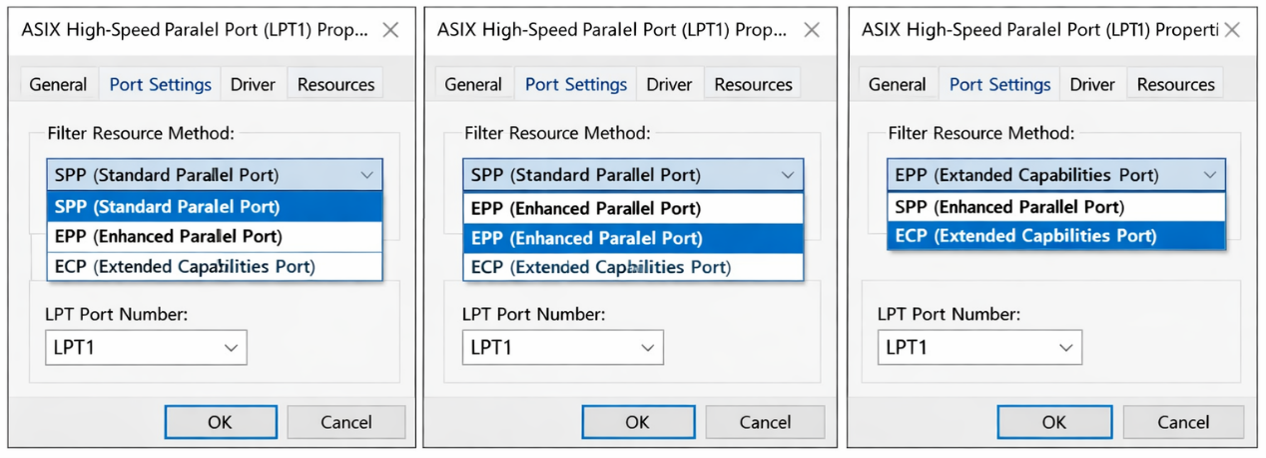
- Change the settings: Right-click the device, select Properties, and navigate to the Port Settings or Advanced tab.
- Set SPP Mode: Under the Filter Resource Method (or relevant option) dropdown menu, change the parallel port mode to SPP (Standard Parallel Port).
- Confirm the Port Number: If needed, change the port number (e.g., LPT2) to the one required by your application (typically LPT1) to ensure device compatibility.
Prev ›
On the WES7 operating system, the CP‑150 card driver cannot be installed. Could you provide a driver for WES7
Industrial & Serial/Parallel Solutions
Next ›
How can I confirm that data is being transmitted in RS 422 mode? Are there specific driver updates or BIOS settings (such as IRQ or PCIe latency) that need to be checked? How can I verify these cards through a loopback test
Industrial & Serial/Parallel Solutions